



Graphical User Interface

  • Provides easy access for the "casual user," with short learning time   
  • Point and click operation  
  • Intuitively control view, rotate, zoom, & time  
  • Easily learned due to object-oriented parts and features  
  • Load data easily by double-click or "recently loaded" menu  
  • Motif and Microsoft Windows standards  
  • OpenGL graphicsGlobal and Part Attributes  
  • Visibility of elements, lines or nodes  
  • Transparency, color and lighting parameters  
  • Line, hidden line and surface display  
  • Line style and thickness
  • Representation mode (3D, edge, feature angle)  
  • Symmetry operations, mirroring  
  • Variable threshold and element blanking
  • Reduced polygon display


Customization
  • No programming ability required
  • Smart defaults based on data can be modified
  • Define keyboard and/or mouse to match other CAE applications
  • Configure preferences according to site and/or individual user
  • Python throughout
  • Even create your own user interface


Distribution and Documentation

  • Easily install from CD, DVD, or web installer
  • Complete documentation including: Getting Started, Installation, How-To, User, Command, and other manuals via Adobe Acrobat. Versions also available for purchase online.


Query 

  • Node/element variable values
  • Node/element labels
  • Element connectivity
  • Dataset summary
  • Min/max values
  • Distance between nodes


Plotting

  • Extract plot data from probe position vs. time or along a line through the model space
  • Animated plotting showing current time and dependent value
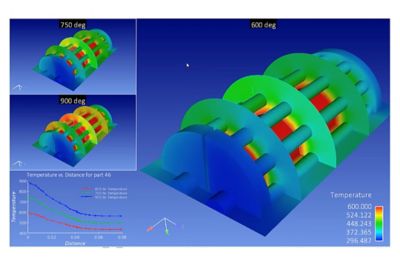
  • Integrated view of plots and 3D geometry for superior appearance
  • Control plotting and reuse layouts with common language and templates


Page Layout and Reports

  • 16 independent and flexible viewports
  • Solid, blended, inherited, or bitmap backgrounds
  • Plots and geometry mixed or separated for superior presentation
  • Annotation including dataset variables and constants
  • Bitmap overlays or watermarks
  • Multiple light sources position and intensity
  • Flexible legends and variable color palettes
  • TrueType Fonts and Internationalized Language Support


Animation

  • Easy to use and professional quality
  • Single record button for most movies
  • Keyframe animation for ultimate flexibility such as part explosion, transparency animation, splined camera animation, and fly-around animation
  • Viewport tracking to follow moving parts
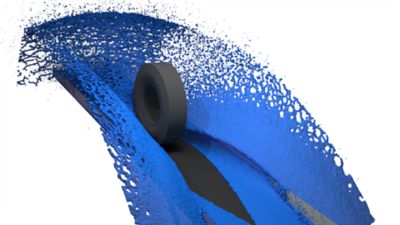
  • Streamline, Linear Load, Mode Shape, Plane Sweep, Isosurface and Transient Solution Animations
  • Direct movie output to Animated GIF, AVI, EVO, FLV, MOV, and MPEG
  • Direct image output to BMP, JPEG, PNG, PS, TIFF
  • Video embedding w/time synching options
  • Camera &  splines for walk through animations
  • Movie titles and merging via EnVe
  • 3D movie scene output: EnLiten, VRML, and stereo EVO movies
  • Photorealistic movies via POV-Ray ray-tracing program


CFD Flow Feature Extraction

  • Boundary Layer Parameters
  • Vortices
  • Shock Surfaces
  • Surface Flows
  • Flow Separation and Reattachment


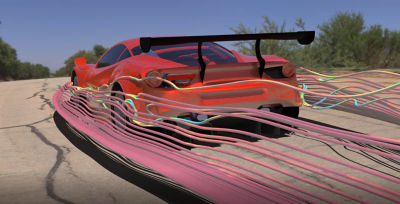
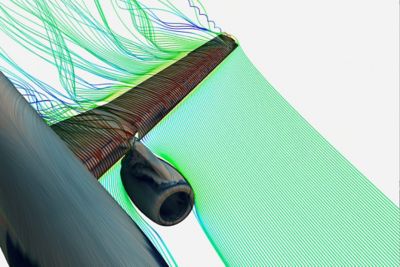
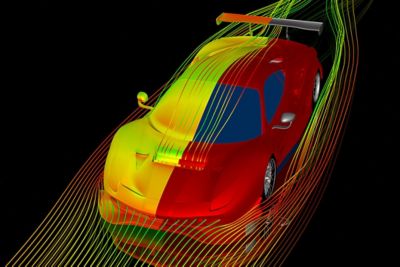
Particle Tracing and Path Lines

  • Interactive trace seeding from point, line, plane, part, or file
  • Massed particle tracing with drag, buoyancy, gravity, viscosity, rebound, friction, etc.
  • Oil-streak or Surface-restricted tracing
  • Transient or steady-state tracing
  • Parallel trace calculations for high performance
  • Highly accurate trace calculation


Other Features

  • Contours/Isosurfaces/Isovolumes
  • Vector Arrows
  • Elevated Surfaces/Profile Plots
  • Data Probe
  • Clipping and Cutting
  • Developed or "Unrolled" Surfaces
  • Material Species Extraction
  • A/B Simulation Comparison
  • Displacements
  • Tensor Glyphs
  • Offset Parts
  • Subset Parts and Part Groups


Multi-physics and Fluid-Structure Interaction (FSI)

  • Read multiple cases from different solvers simultaneously to combine CFD data with FEA data for FSI post-processing, or FEA data with rigid-body dynamics data
  • Offset timelines to synchronize multiple datasets
  • Map results from one solution onto another solution, even another grid, and compare values


CFD Input Interfaces

  • ACCUSOLVE
  • ANSYS/FLOTRAN
  • CFD++
  • CFF
  • CFX
  • CGNS
  • COBALT
  • CRAFT/ CRUNCH
  • DTF
  • ESPERANZA
  • ESTET
  • FAST
  • FIDAP
  • FIRE
  • FLOW-3D
  • FLUENT
  • FOAM
  • GASP/GUST
  • FV-UNS
  • KIVA
  • LEWICE
  • N3S
  • OVERFLOW-2
  • PAM-FLOW
  • POLY2D/POLY3D
  • POLYFLOW
  • POWERFLOW
  • SC-TETRA
  • SPLITFLOW
  • STAR-CD
  • TASCFLOW
  • TECPLOT
  • TETRUSS
  • USM3D
  • VECTIS
  • WIND


FEA Input Interfaces

  • ABAQUS EXPLICIT
  • ABAQUS STANDARD
  • ANSYS
  • I-DEAS
  • LS-DYNA
  • MSC.ADAMS
  • MSC.DYTRAN
  • MSC.MARC
  • MSC.NASTRAN
  • MSC.NASTRAN input file
  • MSC.PATRAN
  • PERMAS
  • RADIOSS


Other Input Interfaces

  • ANALYZE/NIFTI-1
  • CTH
  • EXODUS
  • HDF5 MESH API
  • MFIX
  • MOVIE BYU
  • MP-SALSA
  • NETCDF
  • SAGE
  • SILO MESHTV


Manufacturing Input Interfaces

  • FLOW-3D
  • MAGMA
  • SUPERFORGE
  • TRUCHAS/TELLURIDE


CAD

  • ACIS
  • CATIA v4 & v5
  • IGES
  • IV
  • OBJ
  • Parasolid
  • Pro/ENGINEER
  • SolidWorks
  • STEP
  • STL
  • Unigraphics


Command Language

  • Python scripting
  • Batch processing
  • Automatic file recognition
  • A counterpart command for every user action in the user interface
  • Automatically records commands into file for editing and playback
  • Commands can be saved as named macros
  • Macros to be replayed at any time or be assigned to keyboard keys
  • Sessions to be archived in binary form and then quickly restored


Licensing

  • Standalone (nodelocked) or floating licenses
  • Versions for Windows, UNIX, Linux and Macintosh hardware systems
  • 32-bit and 64-bit platforms at no additional cost
  • Performance by parallel processing
  • Versions for distributed, client/server installations
  • One simple license key that controls everything
  • Time-limited trial version for purchase evaluations


Need more Information?

We've moved to a new website, www.ceisoftware.com.  

Many links on ensight.com redirect to ceisoftware.com.

Try EnSight Menu Button Joomla    CEI EnSight Phone Number

Text Size
Back to Top